Utilize MSOA Functionality Today
With recent enhancements to Merchant Services Online Access (MSOA), now is a great time to review the functionality and capabilities of the dashboard. After you log-in, you will notice the dashboard (image below). Included in the dashboard are key tiles to help you improve day-to-day business operations.
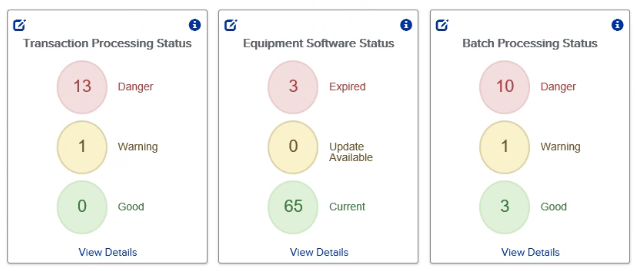
These key dashboard tiles are:
Transaction Processing Status – Displays the time since the last transaction processed at your location(s). A long gap in processed transactions may indicate issues with point of sale machines. Warning and danger thresholds should be set based on your store activity, however, average recommended thresholds are pre-set.
Equipment Software Status – Shows software version details for each device at your location(s). Software should be kept up to date to ensure PCI compliance and avoid unwanted fees.
Batch Processing Status – Displays the last batch date for your location(s). It is recommended that sites settle batches daily. If not settled within 48 hours, transactions will be downgraded and there will be a higher risk of chargebacks from your customers.
Along with the dashboard tiles, an enhancement has recently been added to include store numbers in all MSOA reports. This will allow you to quickly navigate and sort by store number. Click “View Details” on any dashboard tile to access a full report.
If you have any questions about MSOA, please contact CHS Payment Solutions at 1-800-852-5301.